See every step of your Shopify checkout.
Six steps from started to paid, the shoppers lost at each one, and the biggest drop marked for you.
Biggest drop · last 30 days Payment −251 24% of shoppers who reached payment didn't pay.
StartedContactAddressShippingPaymentPaid
Top reason: Card declined
Fix: offer Shop Pay or PayPal as a second way to pay.
Fix: offer Shop Pay or PayPal as a second way to pay.
The Funnel page, step by step
Pick 7, 30 or 60 days. Click any step to see the shoppers who stopped there.
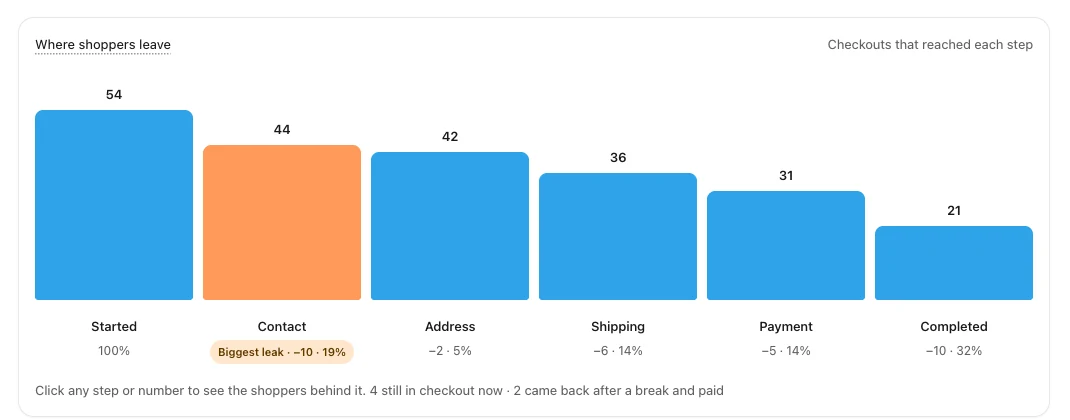
What each step counts
The same six steps on every store, so your numbers mean the same thing week to week.
STEP 1
Checkout started
The shopper pressed Checkout and the page loaded. 1,240 STEP 2
Contact
Email or phone entered and accepted. 1,150 STEP 3
Address
Shipping address entered and accepted. 1,098 STEP 4
Shipping chosen
A delivery method was picked. 1,041 STEP 5
Payment
Payment details sent. Declines and errors land here. 790 STEP 6
Completed
The order went through. 612Click a step to see why they stopped
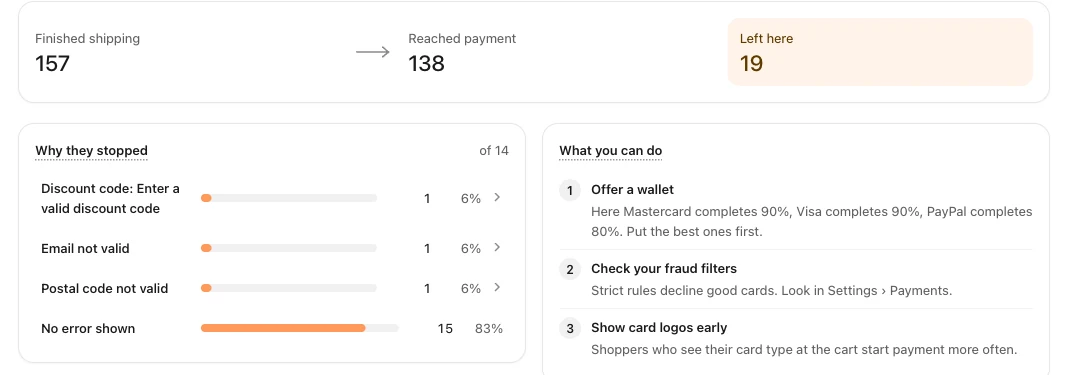
Each step has its own page: how many finished it, how many reached the next one, the errors in between, and what to try.
Questions
How is this different from Shopify's conversion report?
Shopify counts reached checkout and ordered. Checkout Funnel counts the four steps in between, so you see which one shoppers leave at.
Which date ranges can I see?
7, 30 or 60 days. Every view exports to CSV.
Is there a limit on checkouts?
No. Every checkout is counted on the one plan.